Why 3.3V?

TTL Logic Levels

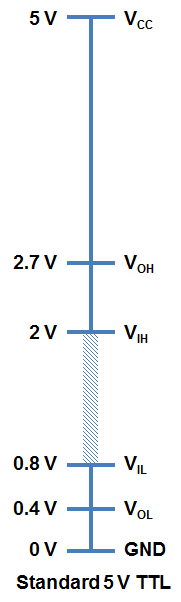
A majority of systems we use rely on either 3.3V or 5 V TTL Levels. TTL is an acronym for Transistor-Transistor Logic. For any logic family, there are a number of threshold voltage levels to know. Below is an example for standard 5V TTL levels:

You will notice that the minimum output HIGH voltage (VOH) is 2.7 V. Basically, this means that output voltage of the device driving HIGH will always be at least 2.7 V. The minimum input HIGH voltage (VIH) is 2 V, or basically any voltage that is at least 2 V will be read in as a logic 1 (HIGH) to a TTL device.

You will also notice that there is cushion of 0.7 V between the output of one device and the input of another. This is sometimes referred to as noise margin.

Likewise, the maximum output LOW voltage (VOL) is 0.4 V. This means that a device trying to send out a logic 0 will always be below 0.4 V. The maximum input LOW voltage (VIL) is 0.8 V. So, any input signal that is below 0.8 V will still be considered a logic 0 (LOW) when read into the device.

What happens if you have a voltage that is in between 0.8 V and 2 V? Well, your guess is as good as mine. Honestly, this range of voltages is undefined and results in an invalid state, often referred to as floating. If an output pin on your device is “floating” in this range, there is no certainty with what the signal will result in. It may bounce arbitrarily between HIGH and LOW.

3.3 V CMOS Logic Levels

As technology has advanced, we have created devices that require lower power consumption and run off a lower base voltage (Vcc = 3.3 V instead of 5 V). The fabrication technique is also a bit different for 3.3 V devices that allows a smaller footprint and lower overall system costs.

In order to ensure general compatibility, you will notice that most of the voltage levels are almost all the same as 5 V devices. A 3.3 V device can interface with a 5V device without any additional components. For example, a logic 1 (HIGH) from a 3.3 V device will be at least 2.4 V. This will still be interpreted as a logic 1 (HIGH) to a 5V system because it is above the VIH of 2 V.

A word of caution, however, is when going the other direction and interfacing from a 5 V to a 3.3 V device to ensure that the 3.3 V device is 5 V tolerant. The specification you are interested in is the maximum input voltage. On certain 3.3 V devices, any voltages above 3.6 V will cause permanent damage to the chip. You can use a simple voltage divider (like a 1KΩ and a 2KΩ) to knock down 5 V signals to 3.3 V levels or use one of our logic level shifters.

thanks to sparkfun for this info.
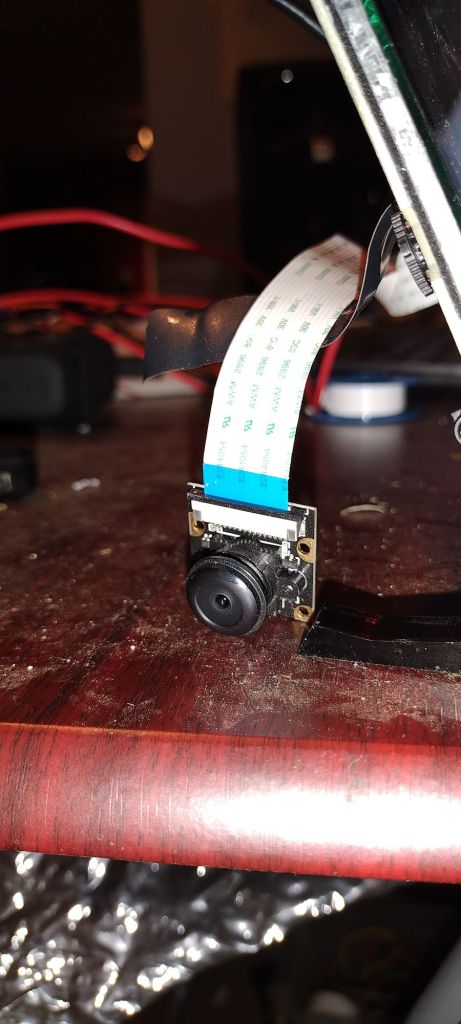
Raspberry pi camera

Clink the link below to view instructions on how to setup and take pictures with the raspberry pi.

https://projects.raspberrypi.org/en/projects/getting-started-with-picamera

Click the link below to control the camera with PYTHON.

https://projects.raspberrypi.org/en/projects/getting-started-with-picamera/4

Click the link below to record video with PYTHON.

https://projects.raspberrypi.org/en/projects/getting-started-with-picamera/6

Digispark Attiny85

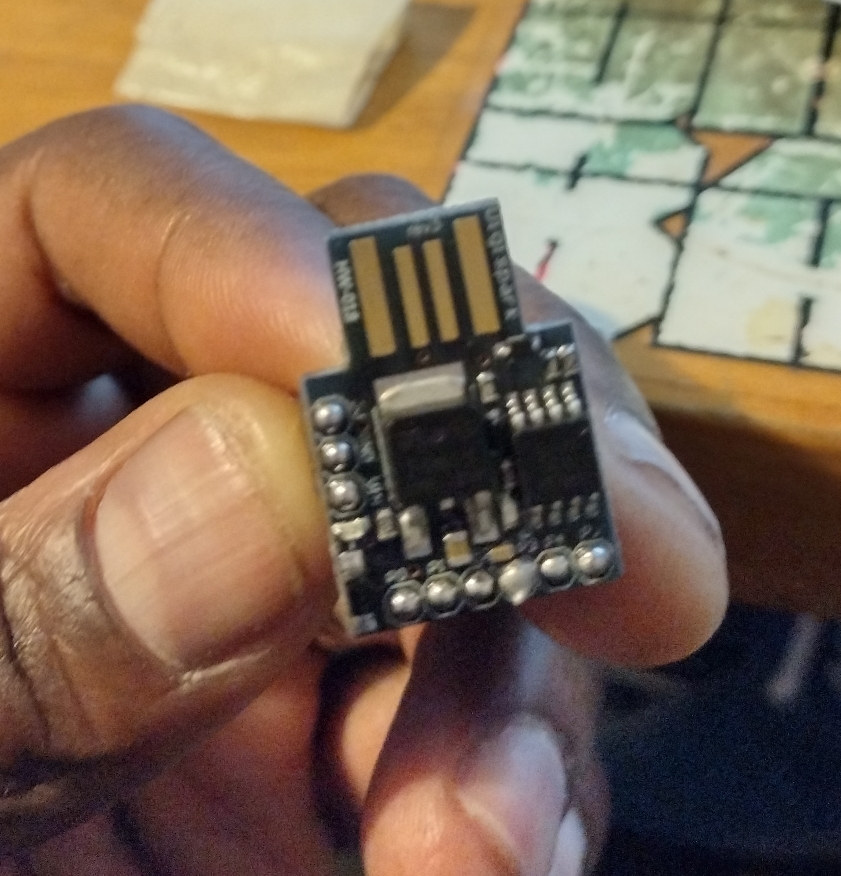
The Attiny85 is an 8-bit, Arduino-like microcontroller. Its like an Arduino but with a smaller form factor, slower processor and fewer I/O pins. Given that, when portability is required, it may be a better option than a full size Arduino.

The board contains all the supporting components. no need to connect to Arduino to program.

Although it uses the same Arduino IDE as the full size board,  the settings and upload process is a little different.

See https://diyusthad.com/2021/07/digispark-attiny85.html for a complete list of proper settings and setup.

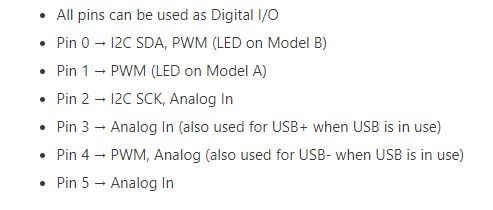
Pins

Being small, powerful, compatible and cheap, do not hesitate to use this in your next IOT protect.

Fear of Riding the Subway

For those of you who are not from NYC and are watching subway crime surge, I am sure you are saying to yourself, “How do they live in that city”.

On April 15, a gunman tried to annihilate a subway car full of passengers. On May 24th, Daniel Enrique was shot dead while riding the Q train. At 4:30 Pm ,On June 6, a woman was pushed to the tracks. And countless other slashings, muggings and attacks have taken place.

For New Yorkers, riding the Subway is not an option. Most don’t have the luxury to telework. Most can’t afford to drive to work. And calling the daily Uber is just not realistic.

The Irony

June 7th, 6:30 am – the tranquility of the morning F train.

It’s moments like this that only New Yorkers can appreciate.

Please Don’t Steal My Catalytic Converter

It has happened again. 7:45 am, I am at work and I receive the following text from my Wife;

Hi love, something suspicious just happened outside the house by my car. Can you see that far out with the camera?

I call her right away, she further explains, in front of the house, a car pulls up next to hers, she hears a drilling noise.

She didn’t have to say anymore. I already knew what had happened. Yes, this is not the first time that the catalytic converters we’re stolen from one of our cars. In a matter of minutes thieves have gotten our EPA certified green house gas limiter.

Typical catalytic thief tool

How does this web work. Some sources say street thieves are getting anywhere from $25 to $300 per cat from scrap yards. The scrap yard sells to a recycler. The recyclers extracts and separate the precious metals.

Catalytics contain Platinum, Palladium and Rhodium, which are rare and in high demand. With the price of Rhodium selling for $22,000 per ounce.

NYC has an automotive jem nicknamed the Iron Triangle. It is a conglomerate of not too nice looking body, glass and muffler repair shops . It is in Willets point, Queens, across the street from Citi Field. Drive slow, the streets are poorly maintained. Within seconds of approaching, someone in the street will solicite you to their shop.

Take your choice anyone of the muffler repair shops will weld in a new universal catalytic converter for whatever the days haggle is. I got my new one installed for $170.

I hope you won’t have to visit this place. But if you have to, it’s a third world jem for a first world problem.

How Electric Scooter HUB Motors work

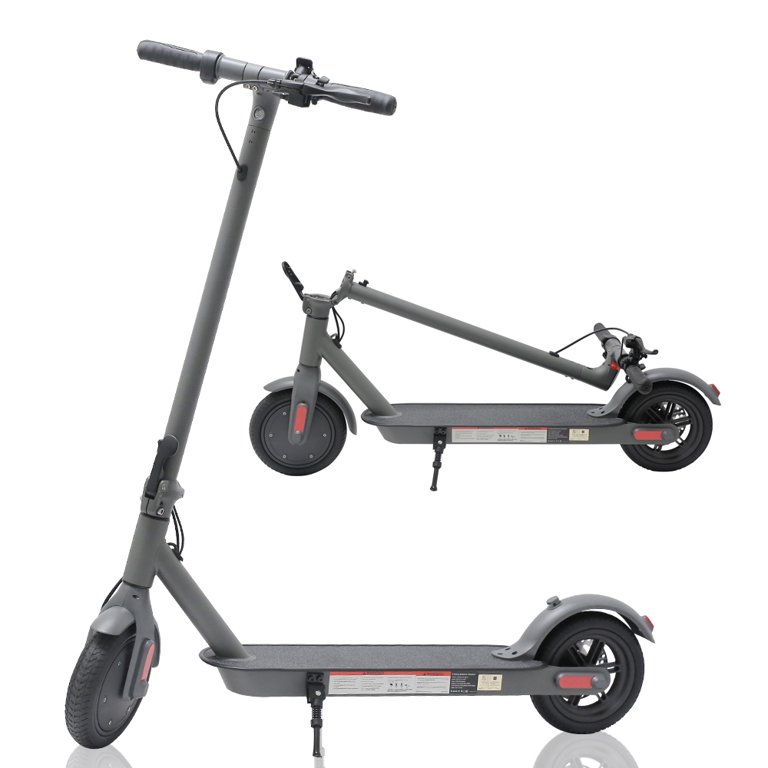
Electric scooters have become very popular, it is a convent way to commute and get around in congested urban areas. The driving force behind the electric scooter is the Hub motor. The hub motor is exactly that, a motor in a hub of a wheel. Hub motors can be placed in the front and/or rear of the scooter.

Outrunner Motor

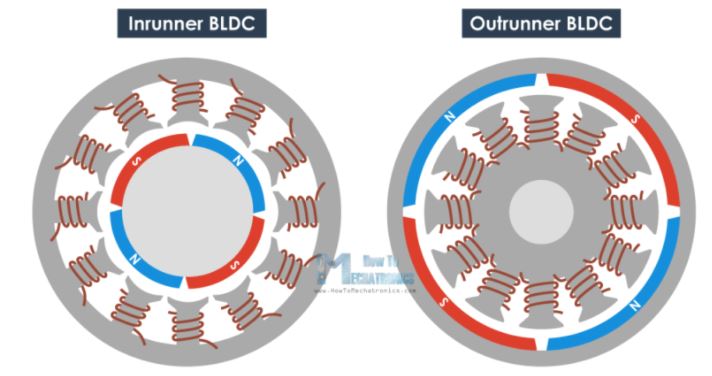
The type of motor that is used in this hub is called a Brushless DC outrunner motor. Outrunner means the outer part (wheel) rotates, opposed to inrunners, which have a rotating inner part. The part that moves is called the rotor and the part that is stationary is called the stator. In Brushless motors, DC voltage is applied to coils without the aid of brushes. Brushes have long been used as a method to provide power to the rotor.

Operation

In a nutshell, the hub motor has two types of magnets, permanent and electromagnet. The electromagnet functions like a permanent magnet, with the added feature that it can be switched on and off electronically. The coils are switched on and off in a sequential manner causing the adjacent permanent magnets to attract or repel, resulting in rotor (wheel) rotation.

The electronic switching is generated by the scooter’s controller.

Parts

Wheel (rotor) with magnets
electromagnet (phase coils)
coil with reed switches to detect movement

See wheel rotation

https://drive.google.com/file/d/1SbJcb1yXrRnc6mkg8XEFBIze4MRrNlw7/view?usp=sharing

Displaying text on LCD

It is quick and easy to connect a liquid crystal display to the Arduino to display text. This setup uses the I2C communication protocol, allowing user to connect two data wires instead of eight. Within your program, make sure you include a Liquid crystal library as well as an I2C library.

See my code:

//YWROBOT
//Compatible with the Arduino IDE 1.0
//Library version:1.1
#include <Wire.h> 
#include <LiquidCrystal_I2C.h>

LiquidCrystal_I2C lcd(0x27,20,4);  // set the LCD address to 0x27 for a 16 chars and 2 line display

void setup()
{
  lcd.init();                      // initialize the lcd 
  lcd.init();
  // Print a message to the LCD.
  lcd.backlight();
  lcd.setCursor(1,0);
  lcd.print("2022 is a good year");
  lcd.setCursor(5,1);
  lcd.print("to code");
   lcd.setCursor(5,2);
  lcd.print("in the snow");
   lcd.setCursor(0,3);
  lcd.print("Powered by s.b.smith");
}


void loop()
{
}

For more info: https://learn.adafruit.com/i2c-spi-lcd-backpack/arduino-i2c-use